Useful programs and some nice tweaks
- If you can’t get your IDL applications that reads mouse clicks to work: try type these two lines in Terminal or an xterm, and restart X11:
defaults write org.x.X11 wm_ffm -bool true
defaults write com.apple.x11 wm_ffm true
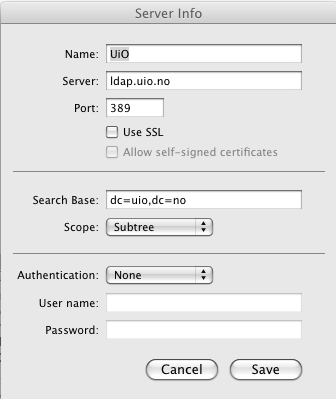
- Set up automatic completion of UiO e-mail addresses in Mail: choose Preferences/Composing, click Configure LDAP, use these settings:
- How to make your own keyboard shortcuts for menu items: as an example, here is a movie showing how to make a shortcut for marking all messages in a Mail folder as read:
- Norwegian (and other non-english languages) spell-checking:
- Leopard: install CocoAspell. Remember to install the actual dictionary after you have installed the Aspell interface (instructions on CocoAspell webpage).
- Move and resize application windows with keyboard shortcuts + clicking anywhere in the window, optional focus-follow-mouse and auto-raise of active windows: Zooom (shareware)
- Safari:
- Ad blocking (or rather, flash blocking) in Safari: ClickToFlash.
- Disable Safari’s ability to open PDF files: type in Terminal:
defaults write com.apple.Safari WebKitOmitPDFSupport -bool YES
- Focus-follow-mouse between Terminal.app windows:
defaults write com.apple.Terminal FocusFollowsMouse -string YES
Published July 13, 2011 10:47 AM
- Last modified Oct. 11, 2016 2:17 PM