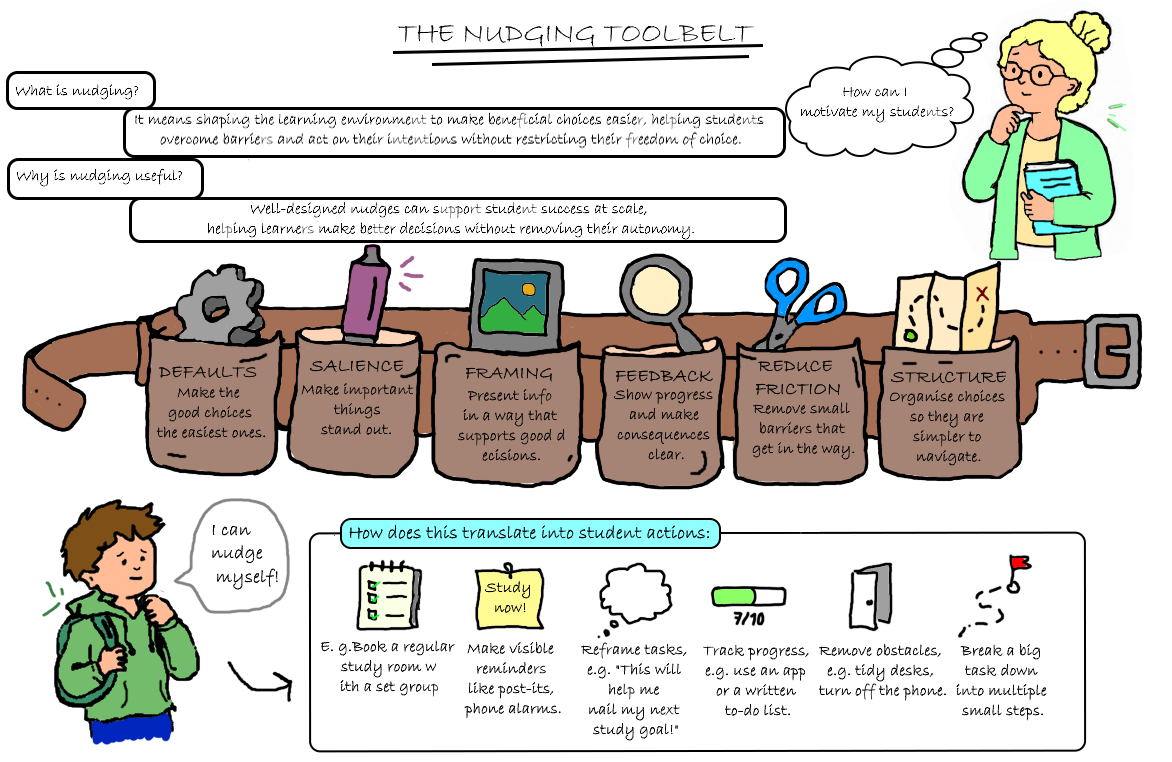
Ideas and tips for Nudging for Learning
At the Geolearning Forum in October 2026 Sarah Scmidt and Anders Mattias Lundmark from iEarth at Department of Geosiences, UiO gathered staff and students to the 75 minutes Workshop: The Nudging Toolbelt to explore how nudges are used and percieved in higher education geosciences in Norway.
The results from the discussions and work in the groups in the workshop is avaliable on this page under the six categories below or as a pdf. The document/minute is by Sarah Ruth Schmid, Doctoral Research Fellow - Section for geodidactics, Dept. of Geosciences, UiO [Oslo, 4th November 2026]
Note that the suggestions from the workshop participants is refined to make them easier to try and added further examples informed by research and practice. Explore the six categories and adapt the ideas to your own learning or teaching context.
What the labels mean:
- Workshop-derived ideas were contributed by workshop participants and lightly edited for clarity and actionability.
- Additional example ideas were added to complement the workshop results; selected examples are linked to research below. The references do not mean that every strategy has been individually tested.
Tips for starting using the toolbelt
Use responsibly: Start with a specific learning behaviour or obstacle, try one small change, and check whether it helps. Not every useful learning support is technically a nudge. Keep alternatives available, make expectations transparent, consider accessibility and avoid shame or pressure.
Evidence note: The sources below inform the design principles and selected additional examples linked to research. They do not establish that every strategy has been tested or will work in every course. Findings from education nudging are mixed and context-dependent.
Ideas and tips in the Nudging Toolbelt
1 DEFAULTS: Offer a useful starting option that people can still change.
- 1. Start with an editable weekly study-plan template. Provide a sample week with course sessions, reading time, assignment work and flexible study blocks. Students can adapt it to their own needs.[Workshop-derived]
- 2. Pre-fill the course calendar with known dates. Add assignment deadlines, exams and important course events from day one; include suggested milestones for larger tasks and allow students to copy or edit them.[Workshop-derived]
- 3. Suggest a workable group size. Set a default of around three to five students for small-group discussion, while allowing students or teachers to adjust it for access needs or task requirements.[Workshop-derived]
- 4. Use an adjustable default for group allocation. When students have not chosen their own groups, assign groups as a starting point and explain how to request a change or alternative.[Workshop-derived]
- 5. Prepare the room for attention and discussion. Arrange round tables or small circles when collaboration is planned, keep clear pathways between groups, check sightlines and ventilation, and preserve accessible seating choices.[Workshop-derived]
- 6. Show readings in weekly order by default. Present the required reading list week by week, so students can see what to read next; keep the complete bibliography available as well.[Additional example]
- 7. Offer ready-to-use discussion and assignment templates. Provide an editable template with headings, prompts or a simple structure that students can use or replace with their own format.[Workshop-derived]
- 8. Open the course page on “This week”. Make the default landing area a short overview of the current week’s priorities, deadlines and links, while keeping all course sections accessible.[Additional example]
- 9. Recommend one first-stop communication channel. Name the course Q&A forum or another agreed channel as the easiest place for general questions, and clearly list other routes for private or urgent matters.[Workshop-derived]
- 10. Make the student representative easy to find. List the course representative as one visible contact option for sharing common questions, without replacing direct contact with teaching staff.[Workshop-derived]
- 11. Offer optional peer-study times. Publish a few suggested recurring study-group slots that students can join, change or ignore rather than asking everyone to organise a group from scratch.[Workshop-derived]
- 12. Place optional practice quizzes in every module. Include a low-stakes practice quiz as a standard, clearly marked option beside the relevant topic; do not make it compulsory or graded by default.[Workshop-derived]
- 13. Use a consistent file-naming pattern. Name files in a predictable way, such as “Week 03 – Topic – Slides”, so the same kind of resource is easy to recognise across modules.[Additional example]
- 14. Suggest group roles that can rotate. Offer a starting set of roles, such as facilitator, note-taker and reporter, but let groups change or rotate them to suit the task.[Additional example]
- 15. Provide an accessible digital copy by default. Make key materials available in a readable digital format and add print-friendly versions where they are useful, rather than making students request access.[Workshop-derived]
- 16. Pre-fill a project planner with suggested milestones. Give students a planner with draft, feedback and final-submission dates already entered; make clear that personal work blocks can be changed.[Additional example]
- 17. Offer different default study environments. Make quiet individual-work areas and collaborative spaces visible options, instead of treating one study environment as suitable for everyone.[Workshop-derived]
- 18. Offer a peer leader when a group needs one. For a peer-study group without a volunteer leader, suggest an older student or trained peer as a starting option; let the group agree on another arrangement.[Workshop-derived]
2 SALIENCE: Make an important cue, resource or next step easier to notice.
- 1. Use a consistent format for course announcements. Post announcements in the same course area and use a predictable structure: action needed, relevant date, short explanation and link.[Workshop-derived]
- 2. Highlight important dates and hand-ins. Use the same visual label for deadlines, exam dates and required submissions across the course page, slides and announcements.[Workshop-derived]
- 3. Put the next action at the top of the course page. Start each module with a brief “Start here” list showing the next task, its deadline and a direct link to the relevant resource.[Additional example]
- 4. Write action-based announcement subject lines. Use subjects such as “Before Thursday’s field session: read the field guide” instead of vague titles such as “Update”.[Additional example]
- 5. Separate required reading from optional material visually. Label required, recommended and extension readings consistently so students can see what they need to prioritise.[Workshop-derived]
- 6. End each lecture with three key takeaways. Use a final slide that lists the main ideas, one point students should revisit and the next step in the course.[Workshop-derived]
- 7. Bring course-related objects into view. Display relevant rocks, maps, specimens or other teaching artefacts in the room when they can prompt curiosity or connect abstract material to examples.[Workshop-derived]
- 8. Place direct action links beside instructions. Put the “Submit assignment”, “Open practice quiz” or “Book a room” link next to the instructions, rather than elsewhere in the course site.[Additional example]
- 9. Show where students are in a module. Use a simple module map or progress marker showing the current topic, completed activities and the next section.[Additional example]
- 10. Place fieldwork preparation where students will see it. Put the equipment list, schedule and field guide link at the top of the fieldwork module and repeat the link shortly before the trip.[Workshop-derived]
- 11. Send reminders when action is due. When possible, send a targeted reminder close to an assignment deadline and include the assignment name, due date and a direct link; avoid repeated generic announcements. [3][Additional example]
- 12. Keep deadline information consistent. Show the same date and time in the syllabus, course calendar and assignment page, with one clearly identified place for the authoritative version.[Workshop-derived]
- 13. Connect learning outcomes to assessment transparently. Point out which stated learning outcomes an assessment addresses and provide practice material, rather than using vague warnings that something “could be in the exam”.[Workshop-derived]
- 14. Make group-work tools visible and ready. Put large sheets of paper, markers or other visual tools on tables before a group activity so students can start using them immediately.[Workshop-derived]
- 15. Keep the discussion question visible. Display or distribute the exact prompt students should discuss, along with the time available and the expected output.[Workshop-derived]
- 16. Mark new or changed course resources. Use a short “New this week” label or a dated update note when materials have changed since the last class.[Additional example]
- 17. Label useful spaces and support routes. Use clear signs or a simple room map to show where students can ask questions, find equipment or access study spaces.[Additional example]
18. Make before, during and after-class tasks easy to spot. Use three short headings in the weekly overview so students can quickly see what to prepare, what they will do in class and what follows afterwards.[Additional example]
3 FRAMING: Present information so its purpose and relevance are clear, without hiding alternatives.
- 1. Connect course topics to real-world use. Start a topic with a concrete example of where the concept is used in the discipline, in research or in professional practice.[Workshop-derived]
- 2. Explain the purpose of each assignment. Briefly state what students are practising, who might use the output and how the task connects to the course learning goals.[Additional example]
- 3. Describe tutorials as a place to practise. Explain what students can try out or ask about in a tutorial and how the activity supports application of course concepts or preparation for assessment.[Workshop-derived]
- 4. Describe quizzes as practice, not just testing. Offer low-stakes quizzes or a playful team recap as a way to check understanding and find topics to revisit; make the consequences and grading status explicit.[Workshop-derived]
- 5. Explain why the course uses different teaching formats. Introduce what lectures, seminars, fieldwork and group tasks each contribute, instead of presenting format changes without context.[Workshop-derived]
- 6. Open with a concrete problem or question. Begin a lecture with a short disciplinary question or case that students can keep in mind while encountering the concepts.[Workshop-derived]
- 7. Give Think–Pair–Share a clear purpose. Tell students what to think about individually, what to compare with a partner and what the class will do with the responses.[Workshop-derived]
- 8. Use student summary presentations to consolidate ideas. Ask small groups to create a short summary that helps peers understand a topic, with clear guidance on what the summary should include.[Workshop-derived]
- 9. Invite students to lead a short lecture segment. Offer a structured opportunity for groups to present part of the material, with prompts and support so the task is manageable and expectations are clear.[Workshop-derived]
- 10. Introduce readings with guiding questions. Give one or two questions that help students notice the key argument or evidence in a reading, and say how it will be used in class.[Workshop-derived]
- 11. Frame peer review as help for the next draft. Explain that the goal is to identify one strength and one useful revision opportunity, not to rank or judge the person who wrote the work.[Additional example]
- 12. Turn grading criteria into a practical checklist. Share assessment criteria in advance and show how students can use them to check a draft before submitting it.[Workshop-derived]
- 13. Make feedback about a next step. Phrase feedback around an action the student can take, such as clarifying a claim or adding evidence, rather than using only broad labels.[Additional example]
- 14. Normalise asking questions before work is finished. Explain that office hours and question forums can be used to test an early idea or clarify instructions, not only to solve a crisis.[Workshop-derived]
- 15. Frame group work as comparing approaches. Ask students to explain and compare their reasoning or methods, rather than presenting group work only as a way to divide the workload.[Additional example]
- 16. Explain the role of optional material. Say whether an extra text is for deeper interest, an alternative explanation or exam extension, so students can make an informed choice about using it.[Additional example]
- 17. Describe support options without stigma. Present study groups, office hours and learning resources as ordinary course tools available to everyone, rather than as remedies only for students who are struggling.[Additional example]
- 18. Give field guides a purpose beyond “read this first”. Point students to specific features, questions or observations to look for during fieldwork so the preparation has a clear use.[Workshop-derived]
4 FEEDBACK: Show progress or consequences in time for people to use the information in a next step.
- 1. Run a short mid-course pulse survey. Ask a few focused questions about what supports learning and what remains unclear, then share a concise summary of the responses.[Workshop-derived]
- 2. Publish a “You said / We did” update. After collecting feedback, explain what will change, what cannot change and why, so students can see that their input was considered.[Workshop-derived]
- 3. Give short feedback after presentations. Provide two specific strengths and one concrete next step after each presentation, using a consistent format students can act on.[Workshop-derived]
- 4. Give feedback while students are still working. During a lesson or workshop, circulate and offer a brief comment or prompt while students can still use it to revise their approach.[Workshop-derived]
- 5. Add explanations to low-stakes quiz answers. After a quiz, show the correct answer and a short explanation, including why a common alternative is not the best answer.[Workshop-derived]
- 6. Use a simple peer-review checklist. Ask reviewers to identify one strength, one unclear point and one question or suggestion for the next draft.[Workshop-derived]
- 7. Return feedback before the next related task. Schedule feedback so students can apply it to a later assignment or milestone, rather than receiving it only after the course has moved on.[Additional example]
- 8. Hold regular course catch-up meetings. Set predictable opportunities to raise questions about progress, workload or unclear requirements, and tell students what they can bring to the meeting.[Workshop-derived]
- 9. Make office hours regular and visible. Publish recurring times, location or online link, booking instructions and whether students can drop in without an appointment.[Workshop-derived]
- 10. Use a one-minute exit reflection. At the end of a class, ask students to write what is clear, what remains uncertain and what they plan to revisit.[Workshop-derived]
- 11. Report back on lecture feedback. Summarise feedback themes and explain any changes to the next lecture, activity or resource.[Workshop-derived]
- 12. Use live polls to identify confusion. Run a short poll during class, show the response pattern and use it to decide which point needs another explanation or example.[Workshop-derived]
- 13. Show progress and the next practice step. Use a simple checklist or progress display to show what has been completed and suggest one relevant next activity; keep it private where appropriate.[Additional example]
- 14. Share rubrics and annotated examples in advance. Provide the assessment criteria and one example with comments so students can see how the criteria apply to actual work.[Workshop-derived]
- 15. Put comments next to the relevant material. Add feedback notes directly to slides, task instructions or the draft being discussed, rather than placing essential comments in a separate hard-to-find file.[Workshop-derived]
- 16. Offer an optional feedback checkpoint before submission. Provide a bookable draft-feedback slot or checkpoint before the final deadline; make the opportunity easy to use without turning it into a compulsory hurdle.[Workshop-derived]
- 17. Send a targeted reminder about an unsubmitted assignment. If the learning platform can identify a missing submission, send a neutral, private reminder with the assignment name, deadline, direct link and support route. [3][Additional example]
- 18. Follow up after a missed tutorial supportively. Send a brief personal message with the next session’s date and catch-up information, without blame or public comparison. A 2025 higher-education study reported improved tutorial attendance after personalised reminders. [4][Additional example]
5 REDUCING FRICTION: Remove unnecessary effort or obstacles while keeping meaningful learning work intact.
- 1. Create one tidy course overview page. Gather links to readings, slides, exercises, schedules and submission pages in one well-labelled overview, organised by week or topic.[Workshop-derived]
- 2. Upload required readings early. Make required course literature available in the expected location before students need it, and identify which texts are compulsory.[Workshop-derived]
- 3. Link directly to each activity. Place a working link to the quiz, reading, assignment or booking page beside the relevant instructions so students do not have to search for it.[Additional example]
- 4. Use the same layout in every course module. Keep headings and resource order consistent from week to week, such as overview, preparation, class activity, follow-up and assessment.[Additional example]
- 5. Provide reusable task templates. Offer a starting structure for an essay, project plan, discussion or presentation while leaving students responsible for developing the content.[Workshop-derived]
- 6. Offer concise notes or annotated slides. Provide a short lecture outline or slide comments that help students follow the session, while leaving space for active note-taking and their own thinking.[Workshop-derived]
- 7. Make software setup easier. Provide tested installation instructions, a starter file and a short troubleshooting guide for tools such as Python, so technical setup does not become an unnecessary barrier.[Workshop-derived]
- 8. Let students add all course dates to a calendar. Provide a calendar subscription or downloadable calendar file so students can import deadlines and sessions without entering them one by one.[Additional example]
- 9. Make office-hour access straightforward. Offer a clear booking link and, when feasible, a predictable drop-in option so students know how to get help without a long email exchange.[Workshop-derived]
- 10. List contact options and response times. Explain where to ask general questions, how to contact a lecturer privately and when students can expect a reply.[Workshop-derived]
- 11. Explain what the course representative can help with. Provide the representative’s contact route and a short description of appropriate questions, feedback or shared concerns they can help communicate.[Workshop-derived]
- 12. Make study-room booking easy to find. Use one current booking link, explain access rules and display room availability where possible.[Workshop-derived]
- 13. Place optional practice tasks next to the relevant topic. Make non-mandatory quizzes and exercises easy to find immediately after the material they practise, with clear information about whether they count toward a grade.[Workshop-derived]
- 14. Make peer-study sign-up simple and consent-based. Provide an opt-in form for students who want a study group and share contact details only with the students who agree to participate.[Additional example]
- 15. Offer an optional phone-parking spot. In a study room, provide a place where students can leave or lock away their phones if they choose; do not require everyone to use it.[Workshop-derived]
- 16. Provide print and digital field materials. Make essential fieldwork documents available both digitally and in print where useful, especially when connectivity or device use may be difficult.[Workshop-derived]
- 17. Send fieldwork instructions well in advance. Share the schedule, equipment list, location, safety information and expected preparation in one checklist before the field session.[Workshop-derived]
- 18. Offer some support times outside standard hours. Where staffing allows, provide more than one time for office hours or supported study and publish those times early for students balancing work or caring responsibilities.[Workshop-derived]
6 STRUCTURE: Organise work so the next action, sequence and responsibilities are clear.
- 1. Break major projects into milestones. Divide a large assignment into stages such as topic choice, outline, draft, feedback and final submission, each with a clear deliverable and date.[Workshop-derived]
- 2. Publish one clear, up-to-date course schedule. Keep lecture dates, seminars, assignment deadlines and exam dates in one maintained schedule, and flag changes clearly.[Workshop-derived]
- 3. Share assessment dates as early as possible. Publish exam dates and major hand-in deadlines at the beginning of the course or as soon as they are confirmed.[Workshop-derived]
- 4. Organise LMS modules in a predictable order. Use the same sequence each week so students know where to find the overview, readings, lecture material, exercises and follow-up tasks.[Workshop-derived]
- 5. Create small study sets with clear completion points. Group related exercises or readings into manageable sets and give each a suggested completion date; label optional work as optional.[Workshop-derived]
- 6. Recap the previous topic and preview the next. Begin with a short retrieval or recap activity and end by explaining how the next session connects to the current one.[Workshop-derived]
- 7. Use a before / during / after class sequence. For each week, state what to prepare beforehand, what students will do during the session and what action or practice follows it.[Additional example]
- 8. Suggest a regular weekly study rhythm. Offer a sample pattern for attending class, reviewing notes and starting assignments, while inviting students to adapt it to their schedules.[Workshop-derived]
- 9. Clarify who is responsible for each group task. At the start of a project, list the outputs, roles and decision responsibilities so students know what the group needs to produce and who is doing what.[Workshop-derived]
- 10. Match the room layout to the activity. Use small circles or round tables for discussion and a layout that supports attention or movement for other activities; explain when the layout will change.[Workshop-derived]
- 11. Explain how groups will be formed. Tell students whether groups will be self-selected, assigned by the lecturer or formed randomly, and when they can ask for a change.[Workshop-derived]
- 12. Rotate group roles and make contributions visible. Use named roles or a short task log so each student has a clear contribution; rotate roles across activities to avoid fixed positions.[Workshop-derived]
- 13. Give discussion tasks clear steps and timings. For example, allow two minutes for individual thinking, five minutes to compare ideas in pairs and three minutes to share a conclusion with the group.[Workshop-derived]
- 14. Use story maps or concept maps. Show how topics, readings or steps in a process connect visually, helping students see the overall structure before working on details.[Workshop-derived]
- 15. Sequence optional exam practice from basic to applied. Provide a progression of short practice tasks, with answers or explanations, so students can move from checking recall to applying concepts.[Workshop-derived]
- 16. Set up recurring peer-study groups. Offer regular study-group times and, where feasible, a peer leader who can help the group agree on a plan and keep the discussion focused.[Workshop-derived]
- 17. Make independent study time actionable. Share available study-room times or suggested work blocks around lectures so students can turn a general intention to study into a specific plan.[Workshop-derived]
- 18. Provide a fieldwork preparation guide. Tell students what to read, which features to look for, what equipment to bring and what they will be expected to do on site.[Workshop-derived]
Acknowledgements
We would like to thank all workshop participants for their valuable contributions, thoughtful discussions, and inspiring ideas. The ideas and tips for nudging learning presented here are based on the group discussions and activities during the workshop.
Thank you to all participants for valuable contributions and great ideas. All ideas are available on this page, or can be downloaded as a PDF.
Further reading
Behavioural Insights Team. (2024). EAST methodology. https://www.bi.team/east-tool/methodology/
A practical framework for designing actions that are Easy, Attractive, Social and Timely.
Damgaard, M. T., & Nielsen, H. S. (2018). Nudging in education. Economics of Education Review, 64, 313–342. https://doi.org/10.1016/j.econedurev.2018.03.008
Review of education nudges, including why understanding the barrier and avoiding pressure matter.
Automated Educative Nudges to Reduce Missed Assignments in College. (2021). IEEE Transactions on Learning Technologies, 14(2), 189–200. https://doi.org/10.1109/TLT.2021.3064613
A higher-education study of targeted assignment reminders.
Cortinhas, C. (2025). Does nudging higher education students improve attendance and does it matter? A quasi-natural experiment. International Review of Economics Education, 49, 100317. https://doi.org/10.1016/j.iree.2025.100317
A study of personalised reminder emails after missed university tutorials.
Oreopoulos, P. (2020). Promises and limitations of nudging in education (EdWorkingPaper No. 20-296). Annenberg Institute at Brown University. https://doi.org/10.26300/5kqf-7j06
A useful overview of promising approaches, null findings and the limits of low-touch nudges.